Gem Integration
Last updated: February 26, 2026
Overview
The Gem + GoodTime Meet integration allows you to synchronize scheduled interviews created in GoodTime Meet with Gem. You can also trigger sequences to stop after a candidate has scheduled a meeting.
Setup
- Login to Gem and click on your Avatar in the bottom left hand corner
- Click on Settings
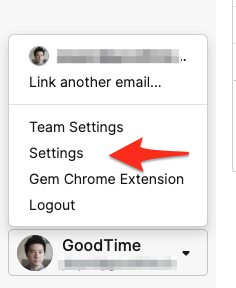
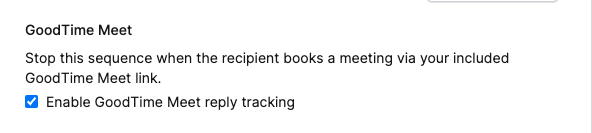
- On the right hand panel underneath “Sequence Defaults,” scroll down to the “GoodTime Meet” section. Check the Enable GoodTime Meet reply tracking box.
- Copy a GoodTime Meet link using the Chrome Extension or directly from the Web app and paste it into one of your sequences and you’re done! 🎉
Using the Integration
Once the integration is set up, scheduling links within your sequence will synchronize from GoodTime Meet into Gem.
Pro Tip: The URL that will be created after sending your sequences will have new text (parameters) added to the back of the URL. This text is used to track and connect the two systems so is important to not remove.