🛡️ User Roles
Last updated: February 26, 2026
Overview
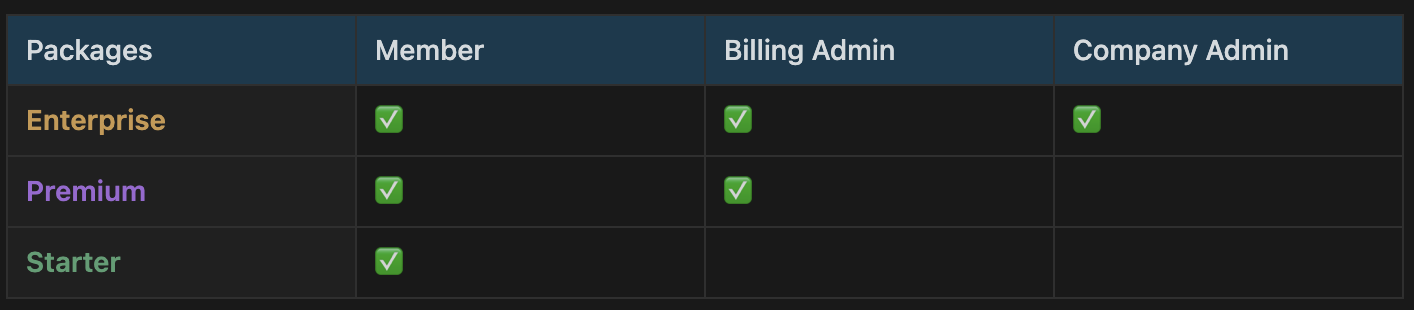
User roles within an organization allow companies using GoodTime Meet to delegate different responsibilities to individuals at the organization. Below is a table of the available roles and their capabilities your organization has access to based on your package.
Members
- Access Calendars and To-do List
- Sync multiple calendars to GoodTime Meet
- Create scheduling links
- Share scheduling links
- Create teams
- Create a profile on Connect (meet with others at the organization)
- View Insights (only applicable to users with Premium or Enterprise seat)
Billing Admin
Everything that Members can do plus:
- Assign users roles (members and billing admins)
- Can create and pay for Cost Centers (only applicable for Premium Package customers)
- Can upgrade users to Premium Seats (only applicable for Premium Package customers)
- Can upgrade users to Enterprise Seats (only applicable for Enterprise Package customers)
Company Admins
Everything that Members and Billing Admins can do plus:
- Assign users roles (members, billing admins, and company admins)
- Assign users Enterprise (Premium) seats (Settings > Company > Billing)
- Update company Branding
- Update company level meeting Categories
- Update company Integrations
- Create/Edit Routes
Changing User Roles and Feature access:
Please see this article for information on changing user roles and features access.